App comparison
10 Best Calorie Counter Apps in 2026
A calorie counter should fit the way you actually eat. This guide compares ten apps by their logging options, nutrition depth, goals, free tiers, and published plan information.
Disclosure: Cal Check publishes this article and appears first in the list. The comparison uses publicly available product information, not personal testing, clinical review, or paid placement. Features, availability, and prices can change by platform, country, or offer.
Best Calorie Counter Apps at a Glance
 Cal Check — Photo, barcode, and nutrition-label tracking.
 MyFitnessPal — Everyday calorie tracking.
 Cal AI — AI-powered food photo logging.
Cronometer — Micronutrient detail.
 FatSecret — Free diary and community.
 Lose It! — Weight-goal routines.
 YAZIO — Fasting and routines.
MyNetDiary — Food-data focus.
 MacroFactor — Adaptive macro coaching.
 Lifesum — Guided eating plans.
How calorie counter apps differ
Traditional logging starts with search, a saved meal, or a recipe. Barcode scanning can speed up packaged-food entries, while photo tools use AI to estimate a meal from an image; those estimates still need a review for portions and ingredients. Macro-focused apps emphasize protein, carbs, and fat, and some go further into vitamins and minerals. Free and paid tiers often divide convenience tools, reporting, coaching, or meal plans—so check the exact offer before subscribing.
Best Calorie Counter Apps Compared
| App | Best for | Free version | AI photo logging | Barcode scanning | Monthly price | Annual price |
|---|---|---|---|---|---|---|
| Cal Check Publisher | Flexible capture | Yes | Eligible plans | Yes | $7.99 | $34.99 |
| MyFitnessPal | Everyday tracking | Yes | Premium | Premium | $19.99 Premium | $79.99 Premium |
| Cal AI | Photo-first | Check current access | Yes | Check current access | Check current pricing | Check current pricing |
| Cronometer | Nutrition depth | Yes | Gold feature | Yes | $10.99 Gold | $59.99 Gold |
| FatSecret | Free diary | Yes | Premium | Yes | $10.49–$14.99 iOS US | $38.99–$59.99 iOS US |
| Lose It! | Weight goals | Yes | Check current access | Premium | Regular monthly not confirmed | $79.99 Premium |
| YAZIO | Fasting | Yes | PRO | Yes | No monthly billing | $23.90 or $47.90 iOS US |
| MyNetDiary | Food data | Yes | Premium / Plus | Yes | $8.99 Premium | $59.99 Premium |
| MacroFactor | Adaptive coaching | Trial only | Yes | Yes | $11.99 | $71.99 |
| Lifesum | Guided plans | Yes | Check current access | Yes | Regular monthly not confirmed | $99.99–$119.99 iOS US |
Prices shown are published US prices reviewed November 19, 2026. iOS US ranges identify distinct App Store offers, not one guaranteed or universal price; store, country, and promotion can change what is offered.
The 10 best calorie counter apps
1. Best for flexible food capture · Publisher
Cal Check
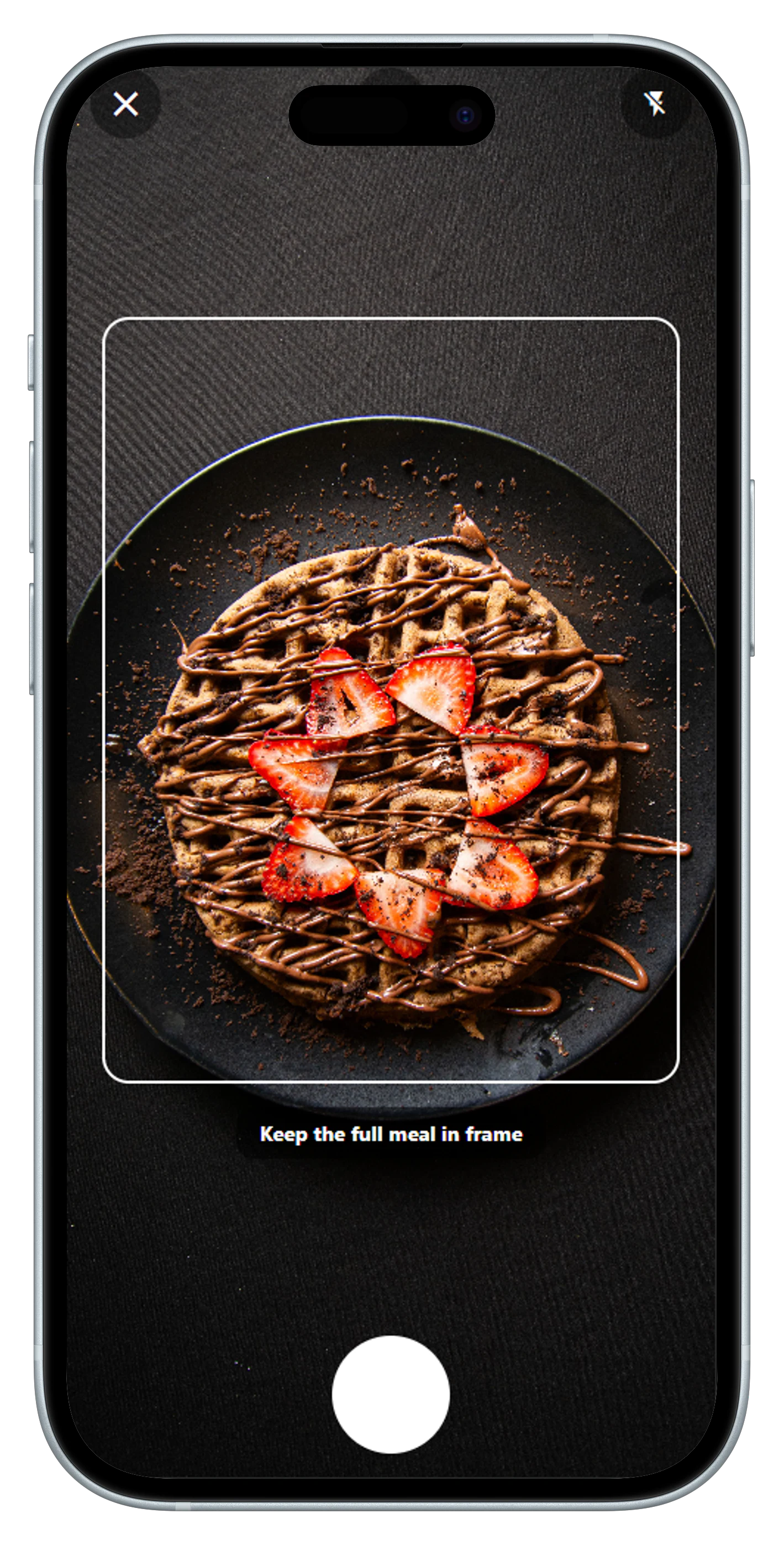
Cal Check combines AI food photo scanning, barcode and nutrition-label scanning, and editable entries in one calorie-and-macro diary. It also includes exercise logging, weight tracking, and personalized goals.
Get Cal Check on Google Play- AI food photos
- Barcode scan
- Nutrition-label scan
- Macros
- Goals
Free tier, strengths, and limitations
A free tier is available; plan access to AI-powered tools can vary. Photo results are estimates, so review foods, ingredients, and portions before saving.
2. Best for a familiar tracking workflow
MyFitnessPal
MyFitnessPal offers food and exercise logging, goals, progress tracking, and partner-app connections. Its paid tiers add faster logging tools and planning features.
- Food diary
- Macros
- Exercise logging
- Meal Scan
Free tier, strengths, and limitations
The free plan covers core food and fitness logging, goals, and progress. Barcode and Meal Scan are Premium features; Premium+ has separate, higher pricing for meal-planning tools.
3. Best for a photo-first approach
Cal AI
Cal AI positions its experience around identifying food from a photo and estimating nutrition. It may suit someone whose first priority is reducing manual meal-entry work.
- AI photo logging
- Calorie estimates
- Macro estimates
Free tier, strengths, and limitations
Public product material confirms the photo-led proposition, but a stable US price was not published on the official pages reviewed. Review any image estimate before relying on it.
4. Best for micronutrient detail
Cronometer
Cronometer is built for people who want a closer look at nutrition data beyond calories, including vitamins and minerals. Gold adds selected advanced logging, charts, and planning tools.
- Micronutrients
- Macros
- Food diary
- Gold tools
Free tier, strengths, and limitations
A free version is available. Its detailed data can be useful when nutrient coverage matters, but may feel more involved than a simple calorie log.
5. Best for a free diary and community
FatSecret
FatSecret combines a food diary, calorie and macro tracking, barcode scanning, exercise and weight records, and community features. Premium adds Smart Food Scan and planning tools.
- Food diary
- Barcode scan
- Community
- Smart Food Scan
Free tier, strengths, and limitations
The core diary and scanner are available free. The US App Store lists multiple monthly and annual Premium offers; those ranges describe listed iOS options, not one guaranteed price across regions or platforms.
6. Best for weight-goal routines
Lose It!
Lose It! centers the experience on a calorie budget and weight goals, with food logging and premium tools for people who want more planning and tracking controls.
- Calorie budget
- Weight goals
- Food diary
- Premium scanner
Free tier, strengths, and limitations
A free version is available. Lose It! publishes $79.99 USD per year as the standard Premium price; monthly store offers are not presented here because a regular monthly price was not confirmed.
7. Best for fasting and routines
YAZIO
YAZIO blends calorie and macro tracking with fasting tools, recipes, routines, and PRO features such as AI-supported photo tracking.
- Macros
- Fasting
- Recipes
- AI photo tracking
Free tier, strengths, and limitations
A free version is available. The US App Store lists distinct 12-month PRO offers at $23.90 and $47.90; the offered price can vary. Official help says PRO is paid upfront for the chosen period and has no monthly billing.
8. Best for a verified-food-data focus
MyNetDiary
MyNetDiary emphasizes a food diary built around staff-verified data, with macros, nutrients, barcode scanning, diet plans, and optional AI tools.
- Verified food data
- Barcode scan
- Macros
- AI tools in Plus
Free tier, strengths, and limitations
The free product includes core food and nutrient tracking. Premium Plus is a different plan with AI features and separately published pricing; values shown are for regular Premium.
9. Best for adaptive macro coaching
MacroFactor
MacroFactor combines a food logger with adaptive calorie and macro targets that respond to logged data. Its official feature set includes photo logging, barcode and label scanning, and nutrition reporting.
- Adaptive targets
- Photo log
- Barcode scan
- Macros
Free tier, strengths, and limitations
MacroFactor offers a trial rather than a permanent free tracker. It is focused on people who specifically want adaptive coaching.
10. Best for guided eating plans
Lifesum
Lifesum pairs food logging with diet programs, meal plans, and guidance. It offers multiple ways to add food, including typed, barcode, photo, voice, and quick logging.
- Food logging
- Meal plans
- Barcode scan
- Diet programs
Free tier, strengths, and limitations
A free version is available, while more programs and plans are associated with Premium. The US App Store lists annual options from $99.99 to $119.99; this is not a universal price. A one-month trial option is not represented as a regular monthly subscription.
Want a faster way to start a food entry?
Cal Check lets you begin with a meal photo, a barcode, or a nutrition label, then edit the entry to make it yours.
Get Cal Check on Google PlayHow we compared these apps
We compared publicly available official information about food-logging methods, nutrition-data depth, AI features, stated ease-of-use features, plan information, and platform availability. This is not an independent clinical analysis, a hands-on test, or a ranking based on ratings. Cal Check is the publisher, and that relationship is disclosed throughout.
How to choose the best calorie counter app
- Choose your fastest reliable input. Search and saved meals suit repeat routines; a barcode can help with packaged food; photos can make a meal entry faster but should be checked.
- Match the data to your goal. A simple calorie budget may be enough. If protein targets or micronutrients matter, look for the right macro or nutrient detail.
- Compare the tier you will use. Check which tools, reports, and plans are free versus paid in your country and store.
- Favor repeatability. The best app is the one whose routine you can keep using.
Frequently asked questions
What is the best calorie counter app?
There is no universal best choice. Cal Check is a practical option for photo, barcode, and nutrition-label scanning; Cronometer suits detailed nutrition; and MacroFactor is aimed at adaptive macro coaching.
Which calorie counter app uses AI?
Cal Check, Cal AI, Cronometer Gold, FatSecret Premium, YAZIO PRO, MyNetDiary Premium Plus, and MacroFactor publicly describe AI-supported features. Access can depend on plan and platform.
Can AI estimate calories from food photos?
Yes. Photo tools can estimate calories and nutrients from an image, but portion size, ingredients, preparation, and image quality can affect the result. Review and adjust the entry when needed.
Are free calorie counter apps enough?
They can be enough for basic food, calorie, and macro tracking. A paid tier may make sense if its specific convenience, planning, or reporting feature will help you stay consistent.
Is Cal Check a good calorie counter app?
Cal Check is a good fit for an Android user who wants AI food photo scanning, calories and macros, barcode and nutrition-label scanning, exercise logging, weight tracking, and personalized goals. Feature access can vary by plan.
How much does Cal Check cost?
In the United States, Cal Check's regular price is $7.99 monthly or $34.99 annually, and a free tier is available. This excludes promotions, trials, and country-specific pricing.
Can I track protein, carbs, and fat?
Yes. All ten apps in this guide support calorie tracking with some level of macro tracking. Check the relevant plan if you need advanced macro targets or reporting.
A simpler starting point
Make Calorie Tracking Simpler with Cal Check
Start with the method that matches your meal: a photo, barcode, nutrition label, or editable entry. Then keep calories, macros, exercise, weight, and goals together.
Install from Google Play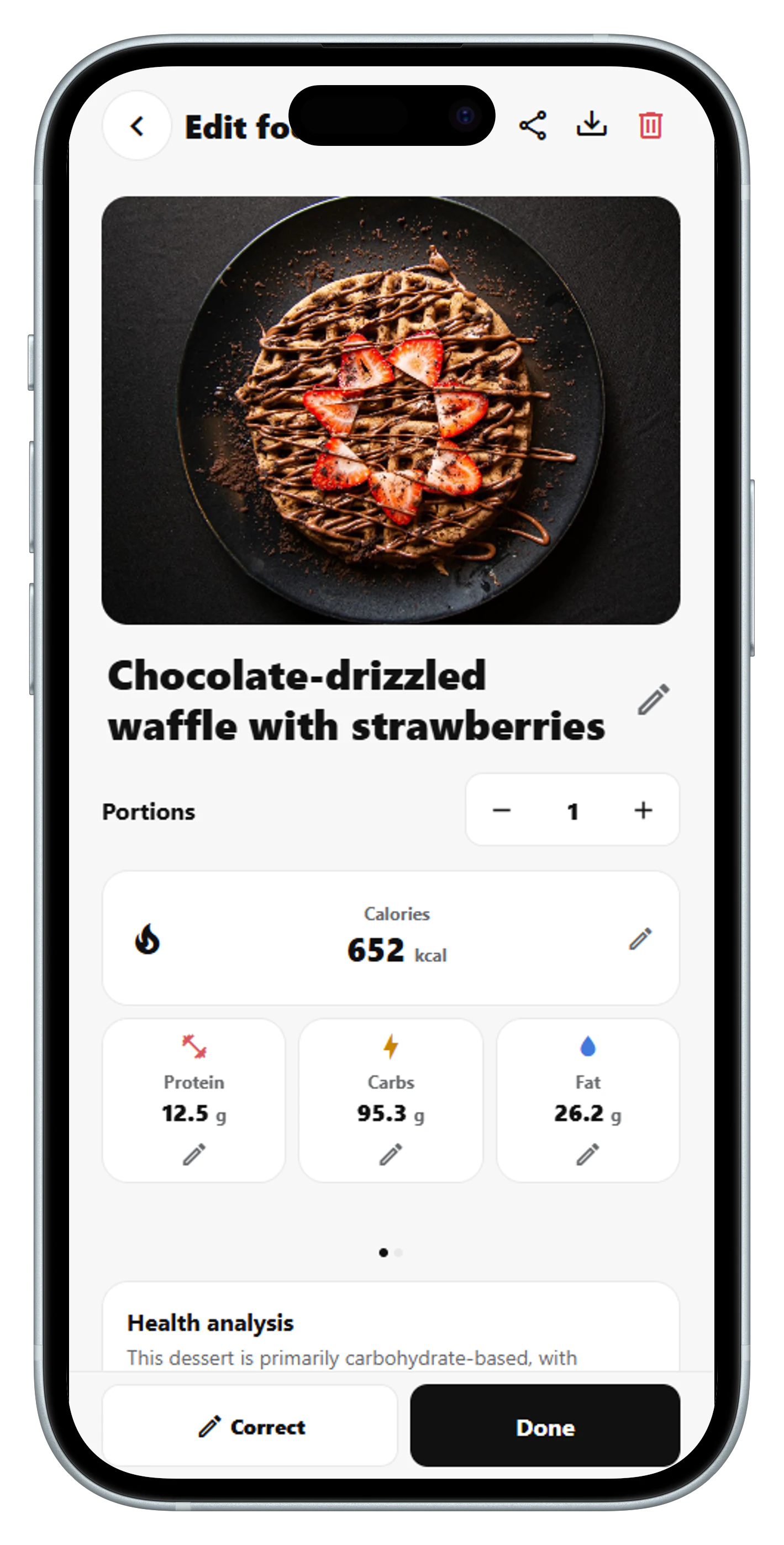
Editorial note: Information was reviewed November 19, 2026 from publicly available official product pages and help centers. Prices, availability, and feature access may change. This article is informational and is not medical advice. For related guidance, see 7 Best MyFitnessPal Alternatives in 2026.